
Get The Most Affordable Hosting in the World!
Starting at just $1.87/month, Vercaa offers unbeatable pricing for world-class web hosting services.
Fast, reliable, and secure hosting to power your website without breaking the bank. Plus, enjoy a free CDN for faster loading times worldwide!
Get Started Now!How to use WordPress to open External Links in a new Tab or Window? [STEP BY STEP]☑️
Today in this blog i will describe you all how to make a link open in a new tab or window in WordPress.
Follow the steps to use WordPress to open external links in a new tab or window:
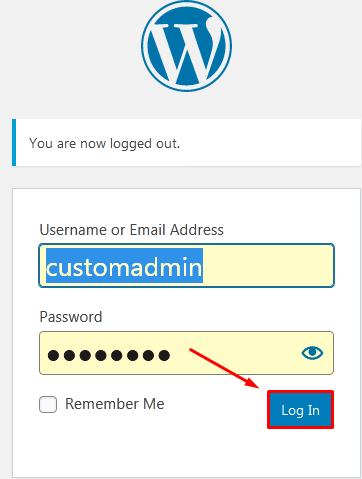
Step::1 Login to your WordPress dashboard
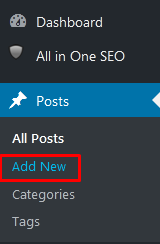
Step::2 Go to the Posts section and click on Add New option
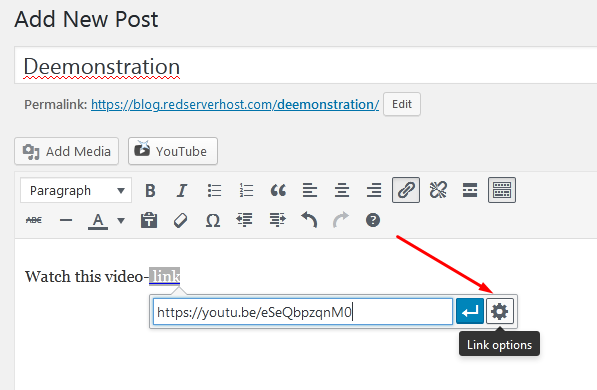
Step::3 Create a post with the relevant content and link URL and click on the Settings icon
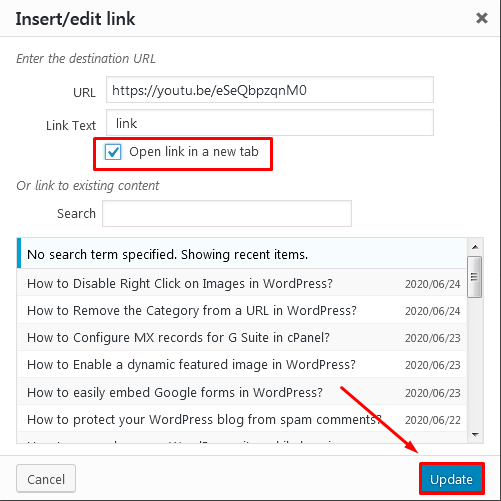
Step::4 Check the “Open link in a new tab” checkbox and click on the “Publish” button.
Now visit your WordPress website and check the link if it is opening in new tab/window or not. This is the easiest way to open an external link on a new tab in WordPress.
Thanks for Reading this article
The End! should you have any inquiries, we encourage you to reach out to the Vercaa Support Center without hesitation.